Hypervisors, Explained: Part II - Virtualization Theory
Contents
Welcome back to Hypervisors, Explained! In this post, we are going to start from the ground up and understand how virtualization is implemented on an Intel x86 CPU.
🔐 User Mode vs Kernel Mode
Modern CPUs provide separation between the operating system kernel and user applications. This is done for security and stability reasons: one buggy process can’t bring down the entire system and a malicious process can’t take over the entire system.
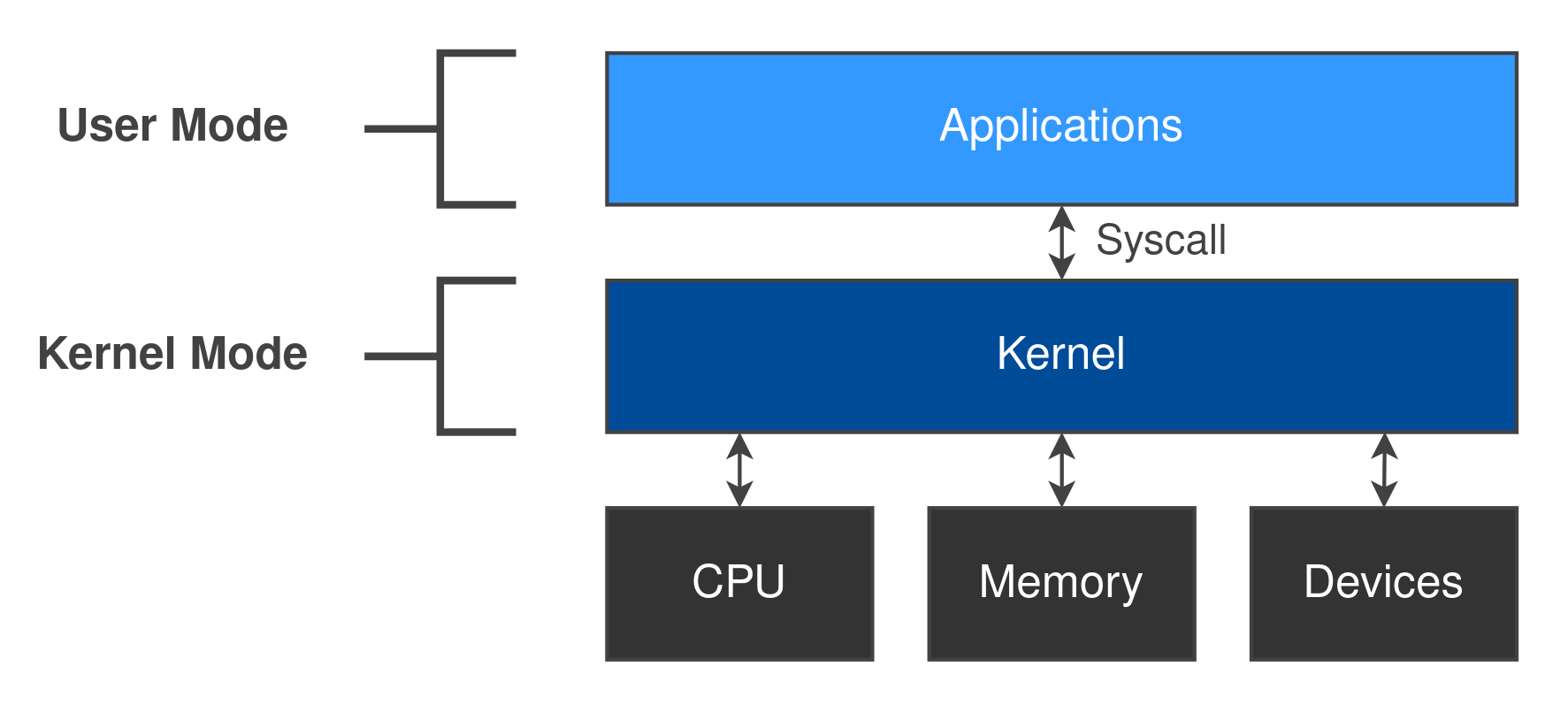
The kernel is the part of the operating system responsible for managing hardware resources and allocating them to software processes. It runs at a high privilege level and has complete control over system resources.
User applications run with fewer privileges and are restricted in what they can do. When a user application wants to perform a privileged action it must ask the kernel to perform the action on its behalf. This is known as a system call or “syscall”. For example, if an application wants to read a file on disk, it must use the sys_read syscall on Linux. The application is not allowed to read the file directly from disk.
You can think of a syscall like calling a function inside the kernel! There are lots of different syscalls for all kinds of privileged actions1.
Protection Rings
Under the hood, the separation between the kernel and user applications is implemented through protection rings. These rings provide hierarchical levels of privilege within the system. While x86 supports 4 protection rings, Linux only uses ring 0 and ring 3 for kernel mode and user mode respectively.
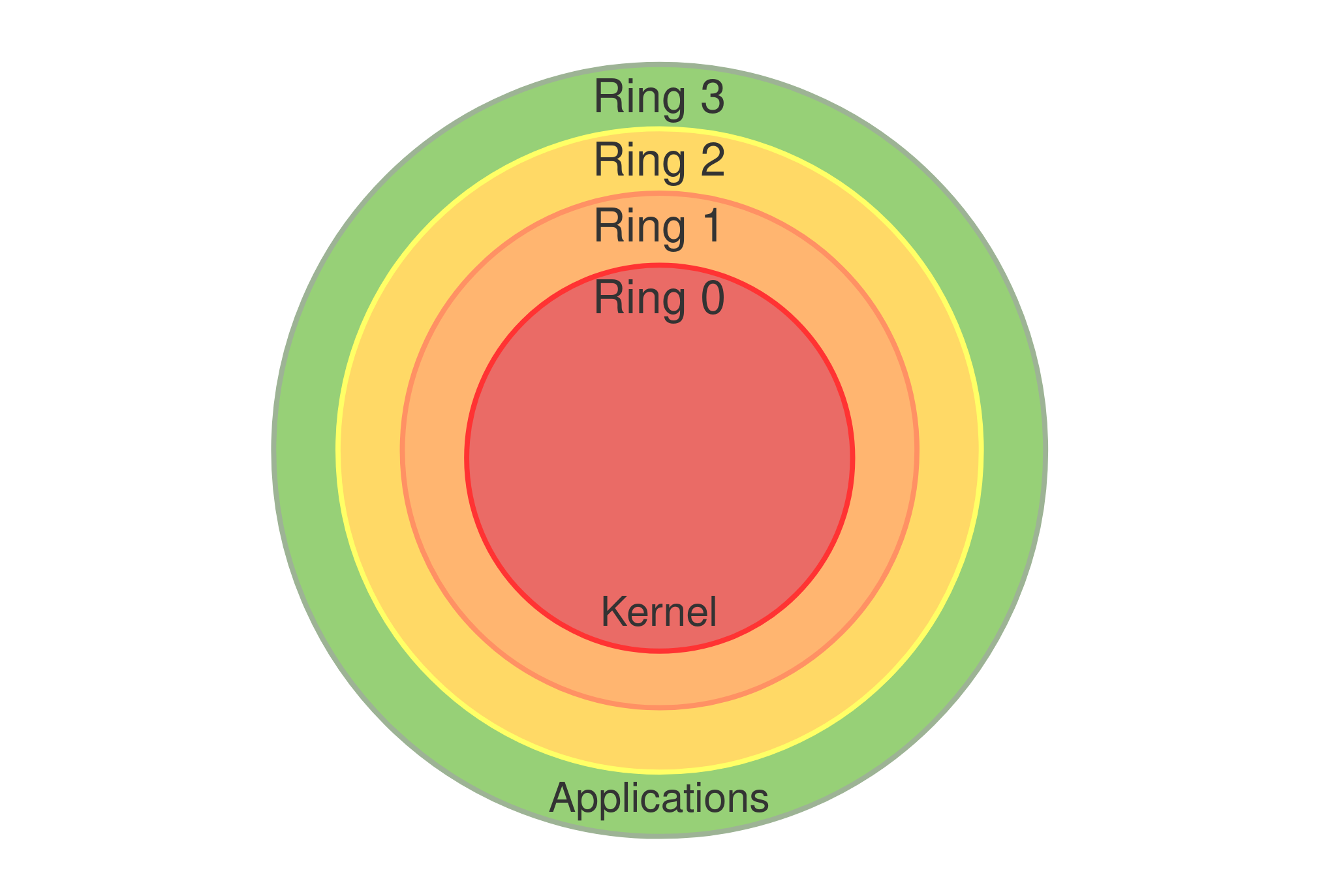
Some CPU instructions can only be executed when running in ring 0 / kernel mode, for example, the rdmsr instruction2. If a buggy or malicious user application tried to execute this instruction, it would trigger a CPU exception (also referred to as a “trap”). This immediately transfers control to the kernel and generally leads to the user application being terminated. These types of instructions are referred to as “privileged” instructions.
During a syscall, the CPU transitions from ring 3 to ring 0. The associated kernel handler for the syscall will perform privileged actions on behalf of the user application and return the result. When the syscall completes, the privilege level will drop back to ring 3. The user application is essentially “paused” until the syscall completes (assuming the application has a single thread).
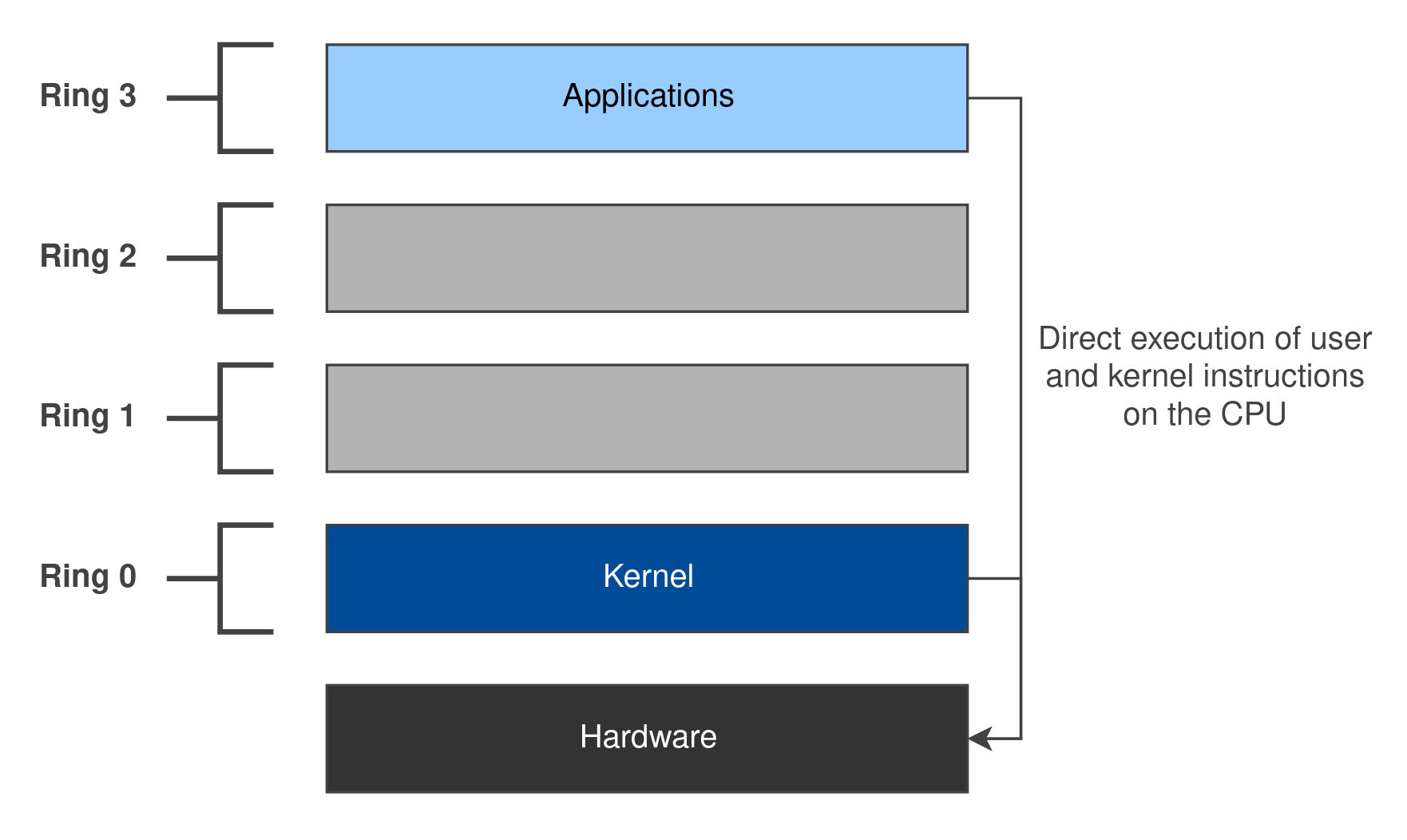
As we will see later, the privilege boundary between user mode and kernel mode is analogous to the privilege boundary between a hypervisor and a guest.
📜 Popek and Goldberg
In their 1974 paper, “Formal Requirements for Virtualizable Third Generation Architectures”, Popek and Goldberg introduced a set of conditions to test whether a computer architecture can support virtualization3.
VMM Properties
A Virtual Machine Monitor (VMM) is a program which satisfies the following three properties:
- Equivalence: a program running under the VMM should behave identically to the same program running on an equivalent machine directly.
- Resource Control: the VMM must be in complete control of the virtualized resources.
- Efficiency: a statistically dominant subset of the virtual processor’s instructions must be executed directly by the real processor, with no software intervention by the VMM.
This might come as a surprise, but most of a guest’s assembly instructions will execute directly on the host’s CPU! While this vastly improves performance, the VMM must ensure the guest is properly isolated from the host machine. As we covered in the last post, an attacker often has complete control over the guest.
The Virtualization Theorem
We can group the assembly instructions of a CPU architecture as follows:
- Privileged Instructions: those that trap if the processor is in user mode and do not trap if it is in kernel mode. The
rdmsrinstruction which we covered earlier fits into this category2. - Control Sensitive Instructions: those that attempt to change the configuration of resources in the system. The
popfinstruction fits into this category4. - Behaviour Sensitive Instructions: those whose behaviour or result depends on the configuration of resources in the system. The
sgdtinstruction fits into this category5.
Theorem: “For any conventional third-generation computer, an effective VMM may be constructed if the set of sensitive instructions for that computer is a subset of the set of privileged instructions.”
Or, in simpler terms: we can create a VMM for a CPU architecture if the set of instructions that modify or are influenced by the configuration of a system will trap if they are executed in user mode. We can utilise this behaviour to implement a very simple method of virtualization called trap-and-emulate.
Trap-and-Emulate Virtualization
The overall idea behind trap-and-emulate virtualization is to run the guest in a lower privilege level than it expects and rely on CPU traps to transfer control to the VMM when the guest tries to execute privileged instructions.
For x86, the VMM runs in ring 0, the guest kernel runs in ring 1, and guest user applications run in ring 3. At this point, it’s worth noting that we are making no modifications to the guest; the guest should be “unaware” that it is running in a virtual machine (the equivalence property).
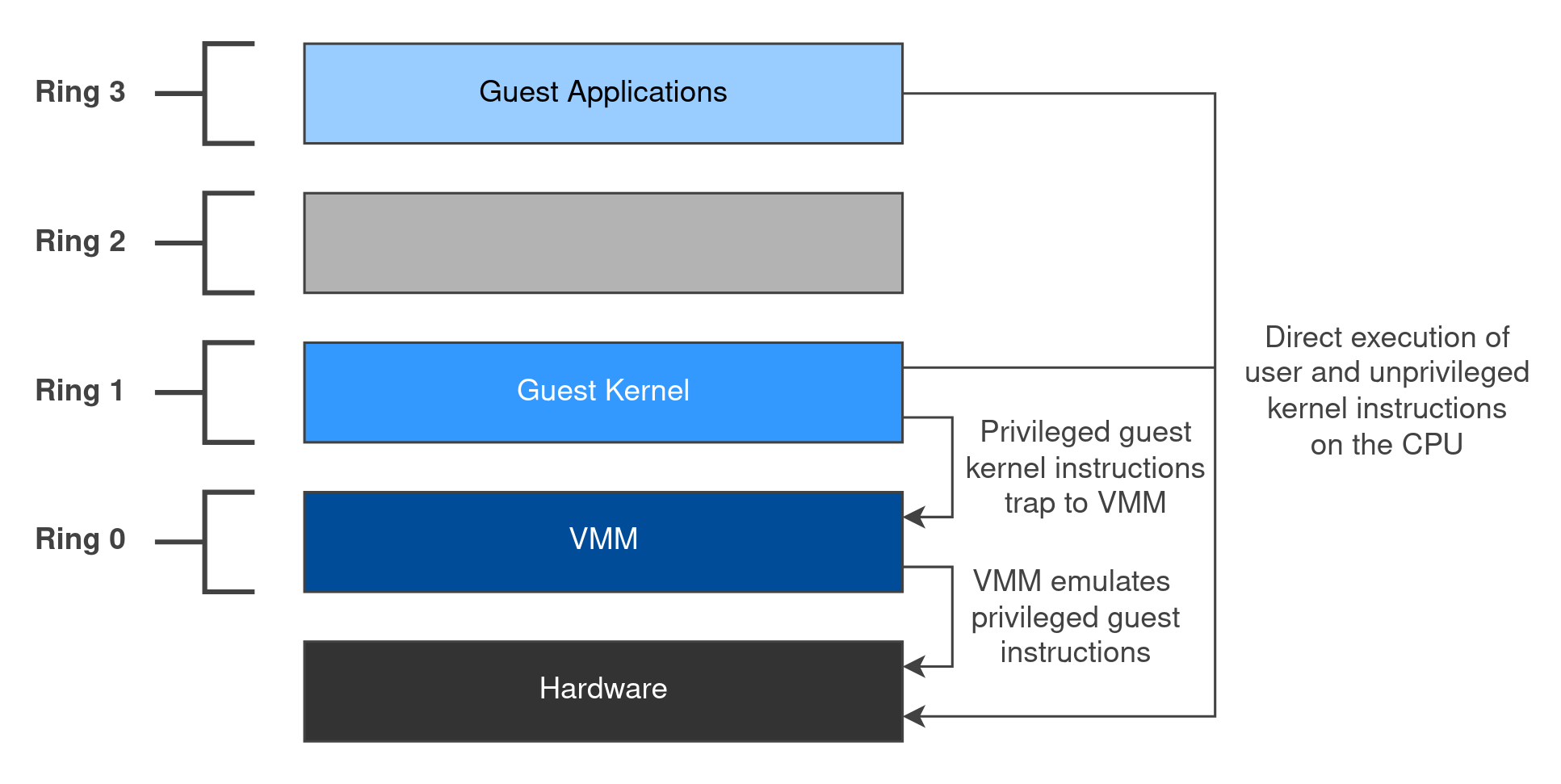
Trap-and-emulate virtualization then consists of 4 repeated steps:
Direct Execution: Unprivileged instructions (from both the guest kernel and user applications) are executed directly on the host’s CPU.
Trap: Eventually, the guest kernel executes a privileged instruction. Since the guest is running in ring 1, this triggers a CPU trap. Control is transferred to the VMM and the guest is “paused”.
Emulation: The VMM inspects the guest’s faulting instruction and emulates its effects by reading and writing the guest’s virtualized state (e.g. registers, memory).
Resume Execution: The VMM transfers control back to the guest which continues processing as normal. To the guest, the privileged instruction ran exactly like it did on real hardware.
This should sound familiar! A trap-and-emulate cycle is essentially just an implicit syscall into the VMM.
Difficulties in x86
So… What if the guest kernel executes the popf instruction? 🤔 For those not familiar with the instruction, here’s an extract from the docs4:
Pops a doubleword (POPFD) from the top of the stack (if the current operand-size attribute is 32) and stores the value in the EFLAGS register.
When operating in protected, compatibility, or 64-bit mode at privilege level 0 (or in real-address mode, the equivalent to privilege level 0), all non-reserved flags in the EFLAGS register except RF, VIP, VIF, and VM may be modified. VIP, VIF, and VM remain unaffected.
When operating in protected, compatibility, or 64-bit mode with a privilege level greater than 0, but less than or equal to IOPL, all flags can be modified except the IOPL field and RF, IF, VIP, VIF, and VM; these remain unaffected. The AC and ID flags can only be modified if the operand-size attribute is 32. The interrupt flag (IF) is altered only when executing at a level at least as privileged as the IOPL. If a POPF/POPFD instruction is executed with insufficient privilege, an exception does not occur but privileged bits do not change.
To summarise: the popf instruction is used to set values in the EFLAGS register (a status register that stores the current state of the CPU). When running in ring 0, all flags can be modified except RF, VIP, VIF, and VM. When running in ring 1-3, all flags can be modified except the IOPL field, RF, IF, VIP, VIF, and VM (assuming IOPL is 0).
Based on this definition, popf is a sensitive instruction - it modifies system flags in EFLAGS, such as IF. However, it is not a privileged instruction - an exception does not occur when it is executed with insufficient privileges. Therefore, on x86:
popf also breaks the equivalence property. Under trap-and-emulate virtualization, the guest kernel believes it’s running at ring 0 but in reality it is running at ring 1. If the guest kernel executes popf, the IF flag can be silently left unchanged. As the instruction never traps, the VMM has no way to intervene and correct this. The guest’s EFLAGS register silently ends up in a different state than it would when running on real hardware.
This gives a proof by counterexample that x86 isn’t effectively virtualizable using trap-and-emulate techniques.
💡 x86 Virtualization Solutions
At this point we’ve shown that the original x86 architecture doesn’t support trap-and-emulate virtualization… But clearly, virtualization exists on x86! So how does it work?
Binary Translation
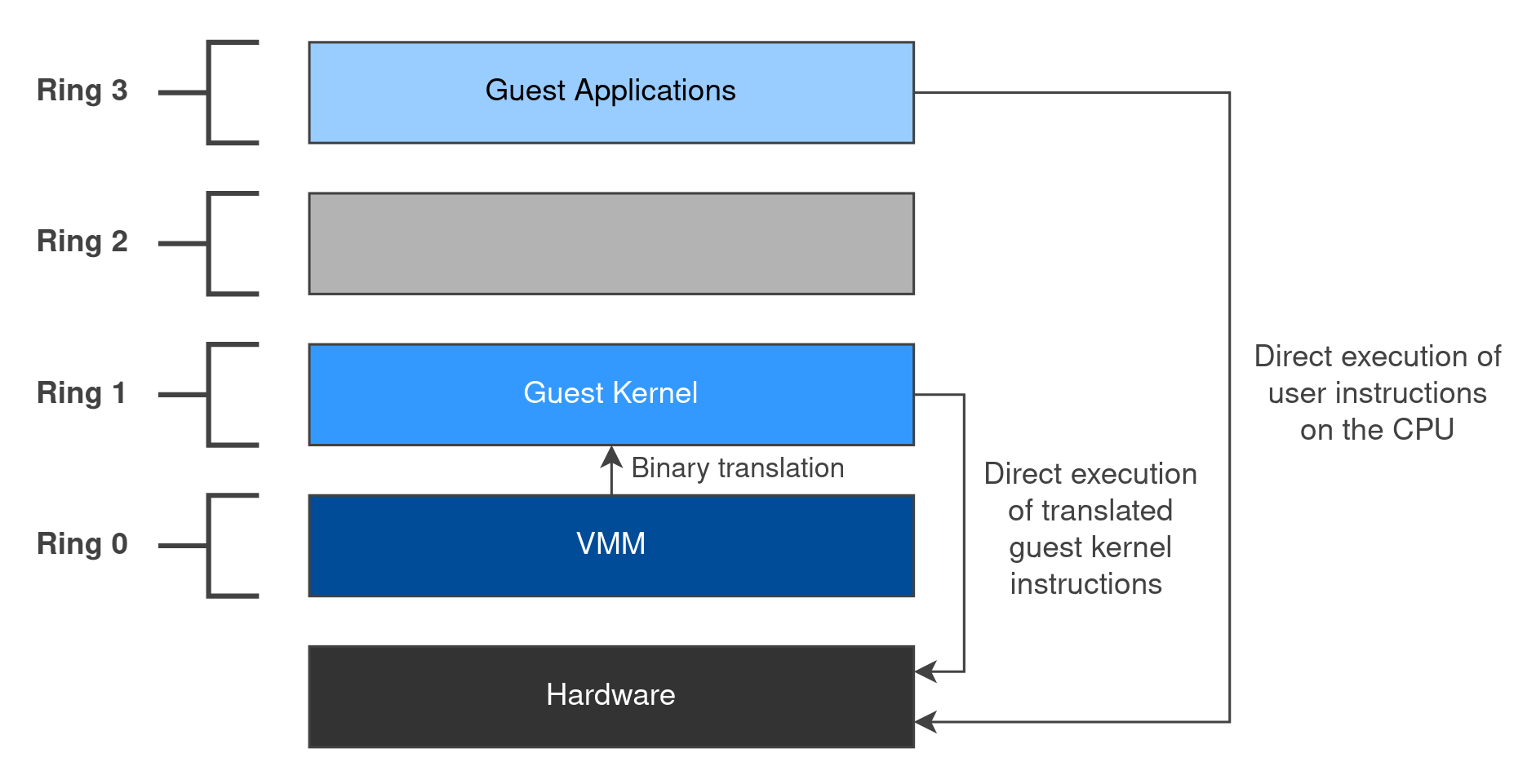
In 1999 VMware released VMware Workstation, the first commercially available hypervisor for x86 CPUs. To solve the challenges of x86 virtualization we’ve encountered, VMware developed binary translation6. This rewrites guest kernel instructions to replace non-virtualizable instructions with new sequences of instructions that have the intended effect on the virtual hardware (similar to a JIT compiler).
The VMM translates the guest kernel’s instructions on demand, a (basic) block at a time, and stores the result in a translation cache. The CPU only executes these translated blocks, never the original guest kernel instructions. As most instructions don’t need to be rewritten, this runs at close to native speed. Guest user applications don’t need translating and run directly on the CPU.
A (simplified) binary translator might rewrite the following guest kernel:
pushfd ; save EFLAGScli ; disable interruptsmov eax, [esi] ; critical sectioninc eaxmov [esi], eaxpopfd ; restore EFLAGScall vmm_pushfdand dword ptr gs:[vcpu_eflags], ~0x200mov eax, [esi]inc eaxmov [esi], eaxcall vmm_popfdIn the example, pushfd and popfd are rewritten into function calls within the VMM, and cli becomes a single and instruction. Rather than modifying the real CPU’s EFLAGS register, the translated instructions operate on a virtualized copy stored within the hypervisor.
With binary translation, the VMM can run in ring 0, the guest kernel in ring 1, and guest user applications in ring 3 - just like trap-and-emulate virtualization!
Paravirtualization
Paravirtualization involves modifying the guest kernel to replace non-virtualizable instructions with “hypercalls” which communicate directly with the VMM. The guest is now “aware” that it is running in a virtualized environment and “asks” the VMM to perform privileged actions for it.
This differs from the other types of virtualization we’ve seen as it requires modifying the guest kernel to add support for each different VMM; an unmodified guest kernel cannot run under a purely paravirtualized VMM. However, this method of virtualization can offer improved performance in some workloads due to a reduced virtualization overhead (e.g. the guest kernel can batch IO operations together into a single hypercall).
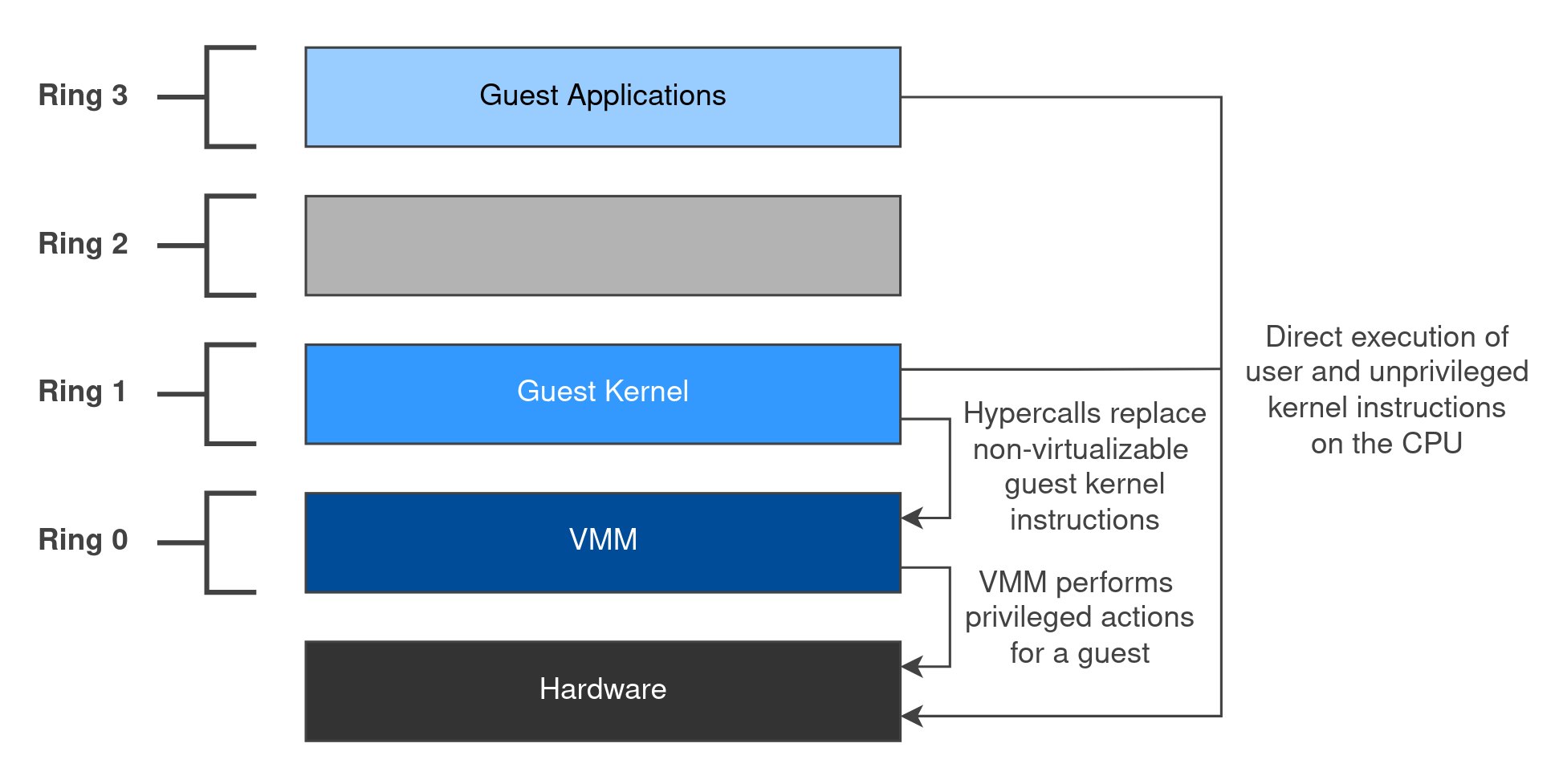
A hypercall is a generic communications channel between the guest and VMM which the guest can use to request privileged actions such as memory management, interrupt handling, and modifying CPU state (e.g. the global descriptor table).
Xen was the first hypervisor to bring paravirtualization to mainstream operating systems such as Linux7. In the following assembly snippet, the guest kernel uses the console_io hypercall to write a log message to the Xen console.
mov eax, 18 ; console_iomov ebx, 0 ; CONSOLEIO_writemov ecx, 12 ; lengthmov edx, message ; "Hello, Xen!\n"int 0x82 ; hypercallJust as a syscall transitions the CPU from ring 3 to ring 0, the int instruction in this case transitions the CPU from the guest kernel in ring 1 to the VMM in ring 0. Where trap-and-emulate is an implicit syscall into the VMM, a hypercall is an explicit one.
Hardware-Assisted Virtualization
Modern CPUs now include hardware support for virtualization. VT-x is Intel’s implementation of hardware-assisted virtualization and AMD-V is AMD’s implementation.
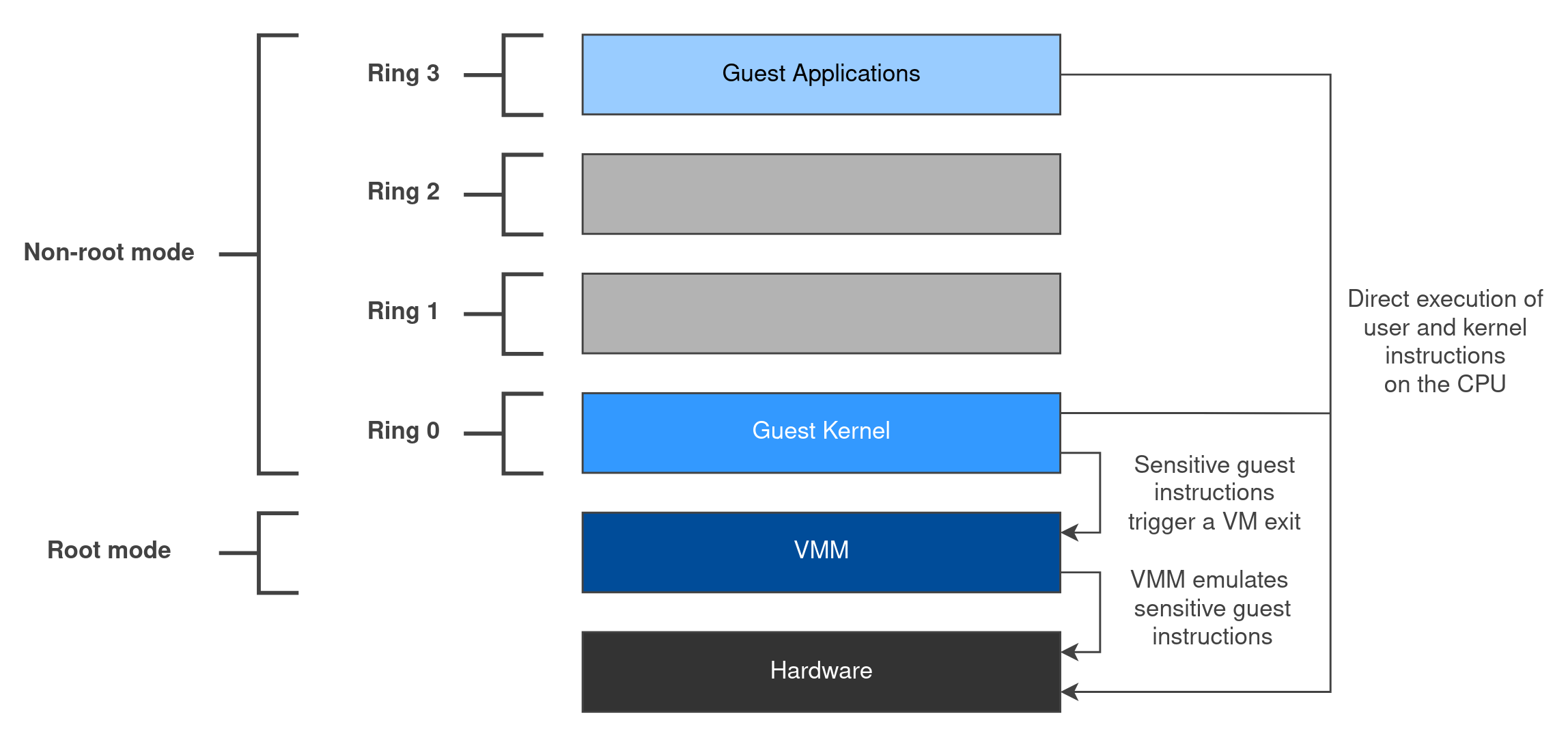
Both implementations modify the CPU to add new assembly instructions and operating modes. The VMM operates at a higher privilege level often described as “ring -1” or “root mode”. This allows the guest kernel to return to ring 0 and the CPU is modified such that sensitive instructions will now automatically transfer control to the VMM. This removes the need for binary translation or a modified guest kernel.
This is essentially trap-and-emulate made possible on x86 thanks to hardware modifications! In the case of the popf instruction, since the guest kernel is running in ring 0, the instruction behaves as it would on real hardware with no special handling required.
Hardware-assisted virtualization doesn’t fully replace other virtualization techniques. Modern hypervisors will often implement paravirtualization on top of primitives supplied by the hardware to improve performance (e.g. high throughput IO devices).
Emulation
As a quick aside, it’s worth covering the differences between virtualization and emulation. With virtualization, we aim to partition physical hardware resources into multiple virtual environments and run guest instructions directly on the host’s CPU. With emulation, the hardware is re-implemented entirely in software. For a CPU, an emulator must implement every single assembly instruction, register, MMU, TLB, and so on. While this has a significant performance impact, it does allow us to run programs and operating systems designed for other architectures! QEMU, Bochs, and Unicorn are examples of CPU emulators.
Even with hardware-assisted virtualization, we still have a need for emulation. While your CPU has support for virtualization, the rest of your hardware components don’t! As we saw in Part I, hypervisors still need to emulate physical devices which the operating system expects to be connected such as the Intel e1000 NIC. You can use paravirtualization to remove full-device emulation and improve performance (e.g. Xen’s paravirtualized networking device) but this requires support in the guest.
🔬 Intel VT-x
Intel VT-x introduces two new modes of operation: VMX root operation, where the VMM runs, and VMX non-root operation, where guests run. VMX root operation is often referred to as “ring -1” as it has higher privileges than ring 0.
VT-x also adds new assembly instructions:
vmxon: Enters VMX root operation.vmxoff: Leaves VMX operation.vmlaunch: Launches a guest by performing a VM entry using the current VMCS.vmresume: Resumes a previously launched guest by performing a VM entry using the current VMCS.vmcall: Triggers a VM exit, allowing a guest to make a hypercall to the VMM.vmptrld: Loads a VMCS, making it the current VMCS.vmptrst: Stores the address of the current VMCS.vmclear: Writes any VMCS data cached by the CPU back to memory and resets its launch state.vmread: Reads a field from the current VMCS.vmwrite: Writes a field to the current VMCS.
Certain instructions and events cause “VM exits” from the guest to the VMM. A VM exit is a transition from non-root operation to root operation. Every VM exit has an “exit reason” which can be interpreted by the VMM to understand what action it needs to take for the guest. A transition from root to non-root operation is known as a “VM entry”.
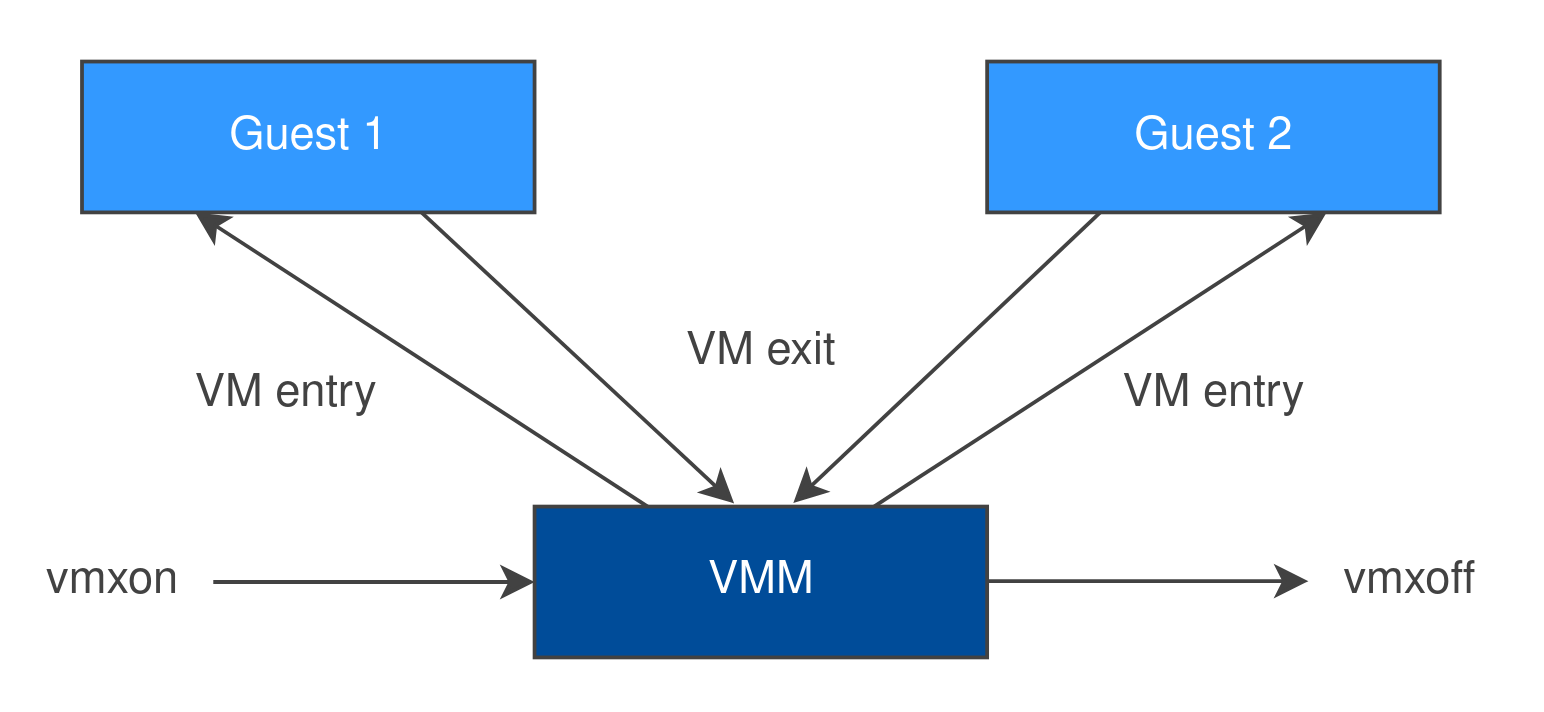
There are many different exit reasons, but some common examples include:
- The guest executes a sensitive instruction (e.g.
cpuid,hltorrdmsr). - An external interrupt arrives from a physical device while the guest is running.
- The guest executes a VMX instruction itself (nested virtualization).
- The guest explicitly triggers a VM exit using
vmcall.
VMCS
A Virtual Machine Control Structure (VMCS) is a data structure which holds information needed to switch between the guest and the VMM. When a VM exit occurs, the CPU saves the guest’s state (e.g. control registers) into the VMCS, and on a VM entry, it loads the guest’s state back into the CPU.
A guest has a configurable number of “virtual CPUs” (vCPUs), each with its own VMCS. Each CPU core can only run one vCPU at a time, so on a system with multiple cores, several vCPUs (from the same guest or different guests) can run at once. If there are more vCPUs than cores, they take turns, just like an OS context switching between processes.
The VMCS can be broken down into 4 main areas:
- The guest state: holds the guest’s registers (such as
RIP,RSPandCR3) which are saved on a VM exit and loaded on a VM entry. - The host state: holds the VMM’s registers which are loaded on a VM exit. The host
RIPpoints to the VMM’s exit handler, so this is where the CPU jumps to after a VM exit. - Control fields: allow the VMM to configure which events trigger a VM exit. Some instructions always trigger a VM exit, and others only if the VMM configures them to.
- Exit information: tells the VMM why a VM exit occurred, such as the exit reason and which IO port was accessed.
Let’s walk through an example. When the guest executes a cpuid instruction, a VM exit is triggered and the CPU saves the guest’s state into the VMCS. The VMM uses the vmread instruction to read the exit reason from the VMCS and emulates the instruction by setting the value of the guest’s registers like the real instruction would. It increments the guest’s RIP value past the cpuid instruction and returns to the guest using a vmresume instruction.
📦 VirtualBox
To put everything together, let’s take a look at Oracle VirtualBox8, a popular open-source Type 2 hypervisor. The following C++ code is a (simplified) extract from the VMM:
static VBOXSTRICTRC hmR0VmxRunGuestCodeNormal(PVMCPUCC pVCpu, uint32_t *pcLoops){ [...] VMXTRANSIENT VmxTransient; [...] VBOXSTRICTRC rcStrict; for (;;) { [...] int rcRun = hmR0VmxRunGuest(pVCpu, &VmxTransient); [...] rcStrict = hmR0VmxHandleExit(pVCpu, &VmxTransient); [...] } [...] return rcStrict;}Source: src/VBox/VMM/VMMR0/target-x86/HMR0VMX-x86.cpp (VirtualBox 7.2.20)
hmR0VmxRunGuest() triggers a VM entry into the guest and returns after a VM exit. hmR0VmxHandleExit() will inspect the exit reason using vmread and perform some action on the guest’s behalf. The process then repeats until the guest shuts down or is terminated by the VMM.
Therefore, a VMM is essentially a while (true) {} loop! Run the guest’s vCPU, collect its exit reason via the VMCS, perform some processing depending on the exit reason, repeat!
It might now be easier to see why and where VM escapes happen. The hmR0VmxHandleExit() function is going to read and process guest-controlled state - if this goes wrong, we’ve got a CVE!
⏳ Next Time…
In the next post, we will focus on how to virtualize memory in x86.